Update HubSpot contacts with Zendesk tickets
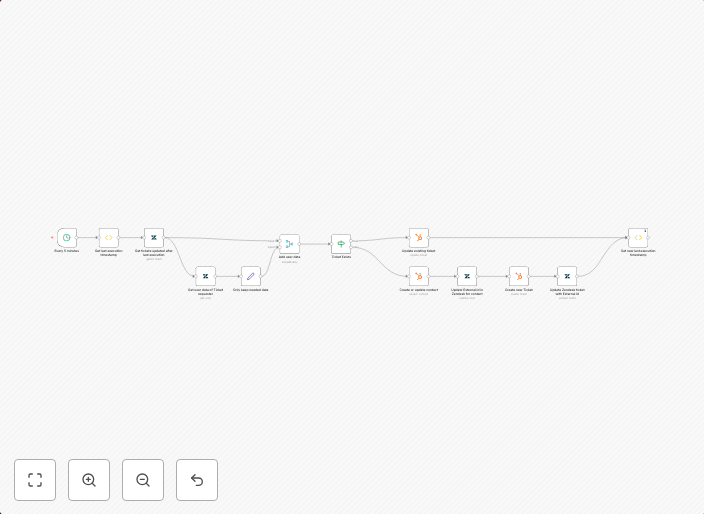
This workflow automatically syncs your Zendesk tickets to your HubSpot contacts. Every 5 minutes, your Zendesk account collects all the new or updated...
Get This WorkflowAbout This Workflow
What This Workflow Does
This workflow automates the synchronization of Zendesk tickets with HubSpot contacts, ensuring real-time updates and eliminating manual data entry. It collects new or updated Zendesk tickets every 5 minutes and updates the corresponding HubSpot contacts. This integration helps businesses maintain accurate and up-to-date customer data across platforms.
Who Should Use This
This workflow is ideal for developers, marketers, and business owners who use HubSpot for customer relationship management (CRM) and Zendesk for ticketing and customer support.
Key Features
- Automatic Syncing: Zendesk tickets are synced with HubSpot contacts every 5 minutes.
- New and Updated Tickets: The workflow collects both new and updated Zendesk tickets for synchronization.
- Real-Time Updates: HubSpot contacts are updated in real-time with the latest Zendesk ticket information.
- Reduced Manual Work: This automation eliminates the need for manual data entry and updates, saving time and increasing efficiency.
How to Get Started
To use this workflow, import it into your n8n account and customize the settings to match your Zendesk and HubSpot credentials. Configure the workflow to fit your specific use case, and enjoy the benefits of automated data synchronization between your CRM and ticketing systems.
Use This Workflow in n8n →Similar Workflows

Affiliate Disclosure: We may earn a commission if you sign up for n8n through our links. This doesn't affect our recommendations.