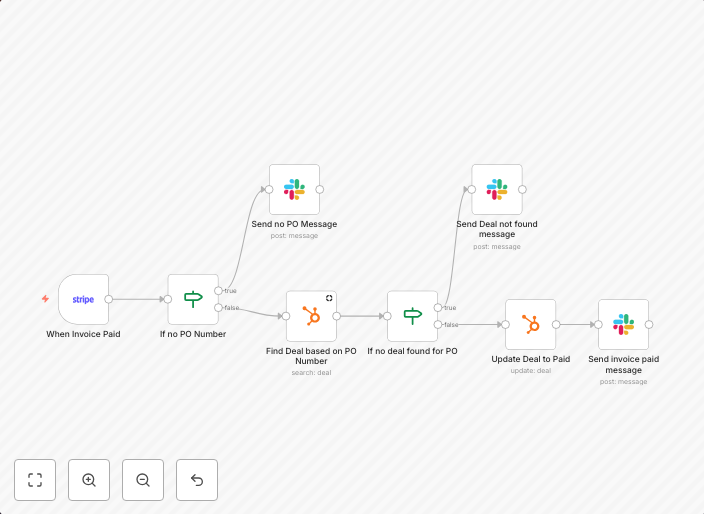
Update HubSpot when a new invoice is registered in Stripe
This workflow automatically posts a message in Slack when a new invoice is uploaded in Stripe, and it updates the fields in the HubSpot CRM. Prerequisites A...
Get This WorkflowAbout This Workflow
What This Workflow Does
This workflow automates the process of updating HubSpot when a new invoice is registered in Stripe. It triggers a Slack notification upon new invoice upload in Stripe and synchronizes relevant fields with the HubSpot CRM. This ensures seamless integration and real-time data consistency.
Who Should Use This
This workflow is ideal for developers, marketers, and business owners who use Stripe for payment processing and HubSpot for CRM management. It's perfect for those seeking to streamline their workflow, reduce manual data entry, and enhance data accuracy.
Key Features
- Automatic HubSpot updates: When a new invoice is uploaded in Stripe, relevant fields are automatically synced with the HubSpot CRM.
- Slack notification: Upon new invoice upload, a notification is sent to Slack, ensuring timely alerts and updates.
- Simplified workflow: This workflow eliminates manual data entry and reduces the risk of errors, freeing up time for more critical tasks.
How to Get Started
To use this workflow, simply import it into your n8n instance and customize it according to your specific HubSpot and Stripe settings. This workflow can be easily adapted to fit your unique business requirements and workflow processes.
Use This Workflow in n8n →Similar Workflows

Affiliate Disclosure: We may earn a commission if you sign up for n8n through our links. This doesn't affect our recommendations.