Upload images to an S3 bucket via a Slack bot
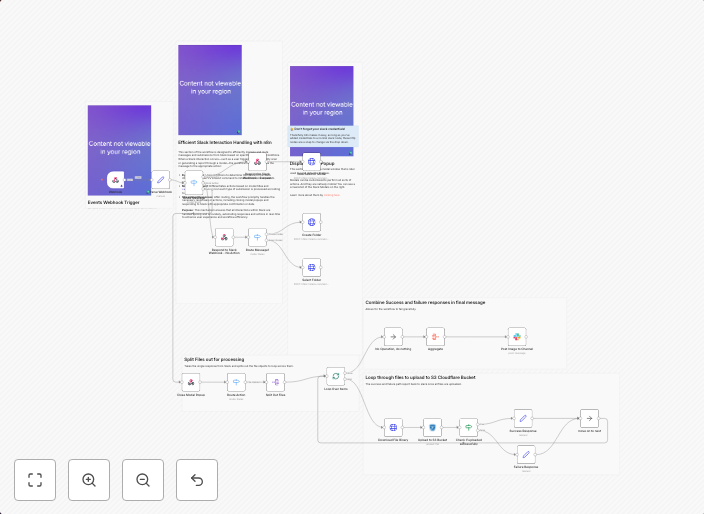
Upload Public-Facing Images to an S3 Cloudflare Bucket via Slack Modal 🛠 Who is this for? This workflow is for teams that use Slack for internal...
Get This WorkflowAbout This Workflow
What This Workflow Does
This workflow automates the process of uploading public-facing images to an S3 Cloudflare bucket via a Slack bot. With this automation, team members can easily share images with others by uploading them through a Slack modal, which are then securely stored in the designated S3 bucket. This streamlines file management and reduces the risk of image loss or misorganization.
Who Should Use This
This workflow is ideal for teams that use Slack for internal communication and collaboration. It is particularly useful for teams in marketing, design, or development roles where image sharing and management are crucial.
Key Features
- Slack Integration: Upload images to the S3 bucket directly from a Slack modal, eliminating the need for manual file transfers.
- S3 Cloudflare Bucket: Securely store public-facing images in an S3 Cloudflare bucket, ensuring easy access and management.
- Image Upload Automation: Automate the image upload process, reducing manual effort and minimizing the risk of human error.
- Centralized File Management: Store all shared images in a centralized location, making it easier for team members to find and access the files they need.
How to Get Started
To use this workflow, simply import it into your n8n account and customize the S3 bucket and Slack modal settings to fit your team's specific needs. From there, team members can start uploading images to the S3 bucket directly from Slack, streamlining your team's file management and collaboration processes.
Use This Workflow in n8n →Similar Workflows



Affiliate Disclosure: We may earn a commission if you sign up for n8n through our links. This doesn't affect our recommendations.