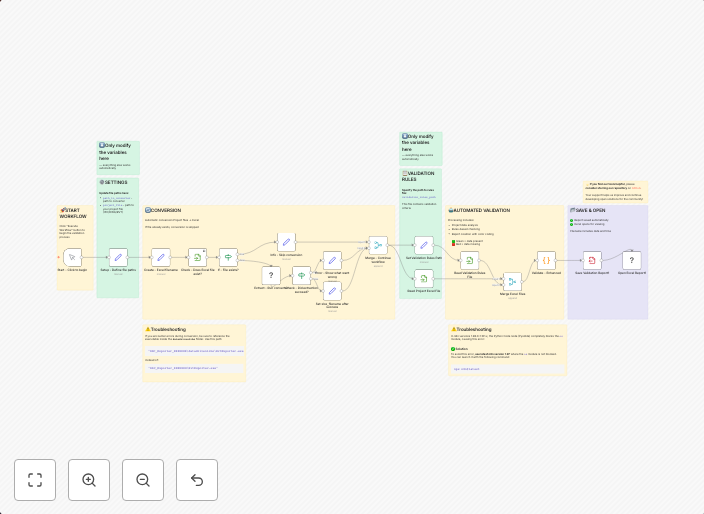
Validate CAD and BIM files against Excel standards (Revit, IFC, AutoCAD, DGN)
This workflow contains community nodes that are only compatible with the self-hosted version of n8n. CAD-BIM Multi-Format Validation Pipeline This workflow...
Get This WorkflowAbout This Workflow
What This Workflow Does
This workflow is designed to automate the validation of CAD and BIM files against standard Excel formats for Revit, IFC, AutoCAD, and DGN files. It ensures that the files conform to the required standards, streamlining the process of reviewing and approving designs and models. By automating this process, users can save time and reduce errors.
Who Should Use This
This workflow is ideal for engineering teams, architects, and construction professionals who work with CAD and BIM files and need to validate them against standard Excel formats. It can also be useful for project managers and quality control specialists who need to ensure that designs and models meet the required standards.
Key Features
- Validates CAD and BIM files against standard Excel formats for Revit, IFC, AutoCAD, and DGN files
- Automates the process of reviewing and approving designs and models
- Ensures compliance with industry standards and regulations
- Integrates with various file formats to support different design and modeling tools
How to Get Started
To get started with this workflow, simply import it into your self-hosted n8n instance and customize it to fit your specific needs. You can then use it to automate the validation of your CAD and BIM files, streamlining your design and review process and improving overall efficiency.
Use This Workflow in n8n →Similar Workflows




Affiliate Disclosure: We may earn a commission if you sign up for n8n through our links. This doesn't affect our recommendations.