Automate LinkedIn Profile Following with Google Sheets and ConnectSafely
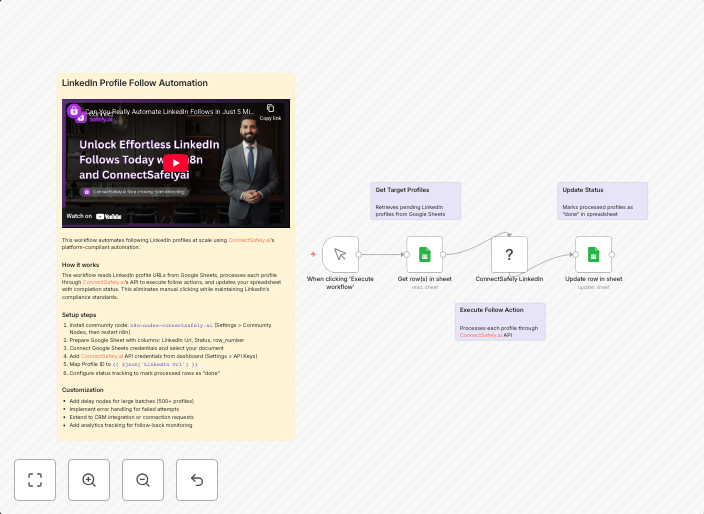
Follow LinkedIn profiles from Google Sheets via ConnectSafely Who's it for This workflow is designed for sales professionals, recruiters, marketers, and...
Get This WorkflowAbout This Workflow
What This Workflow Does
This workflow automates the process of following LinkedIn profiles listed in a Google Sheets document using the ConnectSafely integration. By connecting your LinkedIn and Google Sheets accounts, you can easily manage and expand your LinkedIn network without manual effort. This automation saves time and streamlines your social media marketing and sales outreach efforts.
Who Should Use This
This workflow is designed for sales professionals, recruiters, marketers, and business owners who want to efficiently manage their LinkedIn network and expand their reach. It's ideal for anyone who needs to follow multiple LinkedIn profiles regularly, but doesn't have the time or resources to do so manually.
Key Features
- Follows LinkedIn profiles listed in a Google Sheets document
- Automates the process of connecting with new contacts
- Integrates with Google Sheets for easy data management
- Uses the ConnectSafely integration for seamless LinkedIn authentication
How to Get Started
To use this workflow, import it into your n8n account and customize it by connecting your Google Sheets and LinkedIn accounts. Adjust the workflow settings to match your specific needs and data sources, and then let the automation do the rest!
Use This Workflow in n8n →Similar Workflows

Affiliate Disclosure: We may earn a commission if you sign up for n8n through our links. This doesn't affect our recommendations.