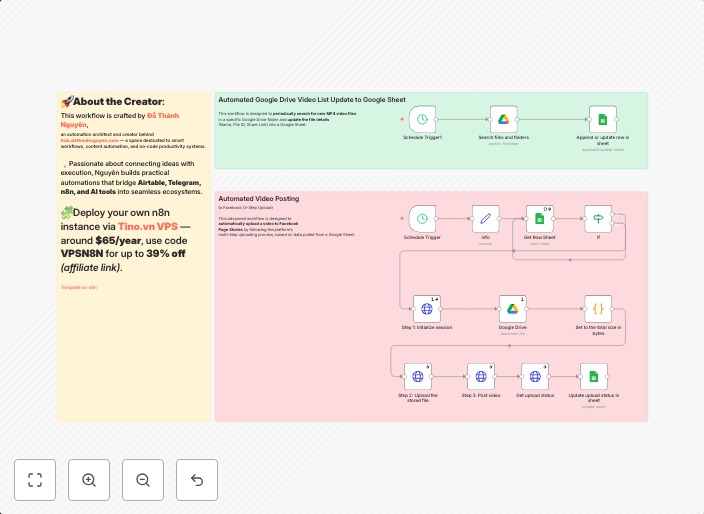
Automate video story publishing to Facebook Page using Google Drive and Sheets
Automated Facebook Page Story Video Publisher (Google Drive → Facebook → Google Sheet)> Recommended: Self-hosted via tino.vn/vps-n8n?affid=388 — use code...
Get This WorkflowAbout This Workflow
What This Workflow Does
This n8n automation workflow enables you to automatically publish video stories to your Facebook Page directly from Google Drive and track the performance in a Google Sheet. It streamlines the process of sharing content across multiple platforms, saving you time and effort. By integrating Google Drive, Facebook, and Google Sheets, this workflow provides a seamless and efficient content publishing experience.
Who Should Use This
This workflow is ideal for social media managers, marketers, and business owners who regularly need to publish video content to their Facebook Page and track its performance. It's also suitable for developers and IT professionals who want to automate social media tasks and integrate them with Google Drive and Sheets.
Key Features
- Automated video publishing: Publish video stories to your Facebook Page from Google Drive without manual intervention.
- Google Sheets tracking: Track the performance of your published content in a Google Sheet for easy analysis and insights.
- Integration with Google Drive: Select and upload video files from Google Drive to Facebook for publishing.
- Scalable and customizable: Adjust the workflow to fit your specific needs and automate multiple tasks with ease.
How to Get Started
To use this workflow, simply import it into your n8n account, customize the Google Drive, Facebook, and Google Sheets credentials, and connect your accounts. You can then configure the workflow to suit your specific needs and start automating your video publishing process.
Use This Workflow in n8n →Similar Workflows

Affiliate Disclosure: We may earn a commission if you sign up for n8n through our links. This doesn't affect our recommendations.