Automated Instagram reels posting using Google Drive, Cloudinary & Sheets
Who is this for? This workflow is ideal for social media managers, content creators, marketing teams, and automation enthusiasts looking to streamline their...
Get This WorkflowAbout This Workflow
What This Workflow Does
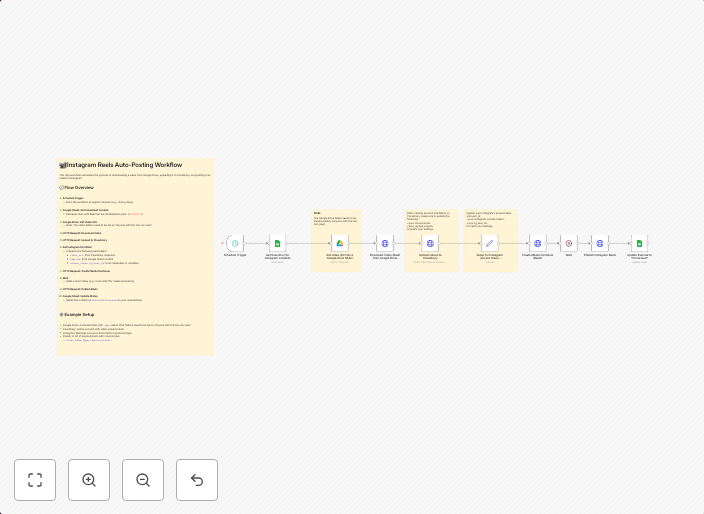
This n8n automation workflow enables the automated posting of Instagram reels using content stored in Google Drive, optimized with Cloudinary, and managed in Google Sheets. It streamlines the process of social media content publication by integrating multiple tools into a seamless workflow. This automation saves time and reduces manual effort for content creators and social media teams.
Who Should Use This
This workflow is ideal for social media managers, content creators, marketing teams, and automation enthusiasts looking to streamline their Instagram content publication process. It is perfect for businesses or individuals who regularly post high-quality content on Instagram and want to reduce the time spent on content preparation and publishing.
Key Features
- Automated content retrieval: Pulls multimedia content from Google Drive and stores it in Cloudinary for optimization.
- Cloudinary optimization: Automatically optimizes content for Instagram reels, ensuring high-quality visuals and fast upload times.
- Content scheduling: Uploads and schedules Instagram reels based on a set schedule or on a schedule defined in Google Sheets.
- Data management with Google Sheets: Manages content metadata, scheduling, and performance metrics in Google Sheets for easy tracking and analysis.
How to Get Started
To use this workflow, import it into your n8n instance and customize the Google Drive, Cloudinary, and Google Sheets integrations to match your specific setup. Adjust the workflow to fit your content scheduling needs and upload high-quality content to Instagram reels with ease.
Use This Workflow in n8n →Similar Workflows

Affiliate Disclosure: We may earn a commission if you sign up for n8n through our links. This doesn't affect our recommendations.