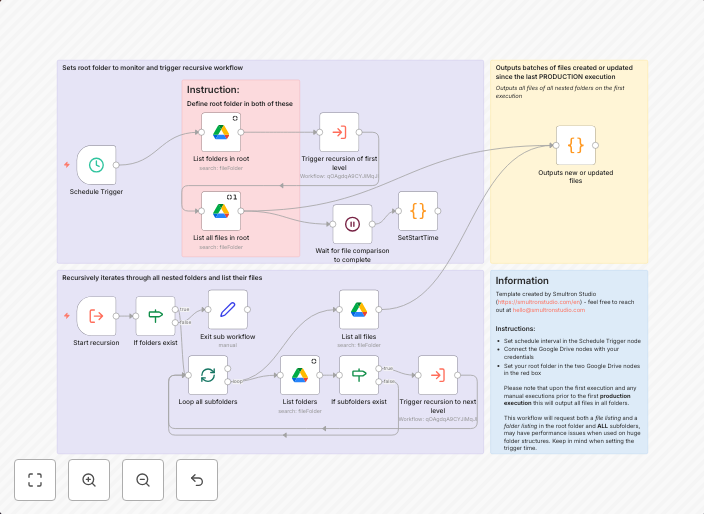
Scheduled monitoring of new & modified files across Google Drive folders
This n8n template allows you to, on a schedule, list all files that have been modified since the last execution in a Google Drive folder and in all its...
Get This WorkflowAbout This Workflow
What This Workflow Does
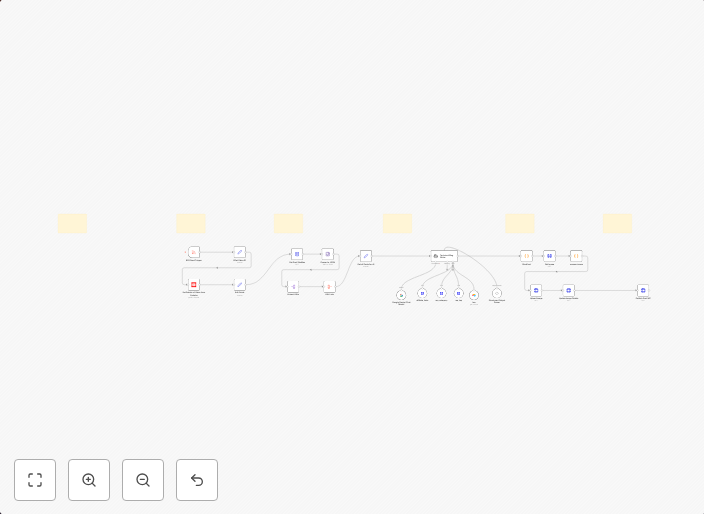
This n8n template enables scheduled monitoring of new and modified files across Google Drive folders. It periodically lists all files that have been updated since the last execution, allowing you to track changes and stay up-to-date with the latest file updates. This automation helps you maintain a real-time overview of your Google Drive folder's activity.
Who Should Use This
This workflow is ideal for developers, marketers, and business owners who rely on Google Drive for file sharing, collaboration, or data management. It's perfect for anyone who needs to monitor file updates, track changes, or automate tasks based on file modifications.
Key Features
- Scheduled Scanning: The workflow automatically scans Google Drive folders on a scheduled basis to detect new and modified files.
- File Tracking: It keeps a record of changes made to files since the last execution, allowing you to track updates and modifications.
- Real-time Monitoring: Get instant notifications when new or modified files are detected, enabling you to respond promptly to changes.
- Google Drive Integration: Seamlessly connect your Google Drive account to the workflow, enabling easy access to your files and folder structures.
How to Get Started
To use this workflow, simply import it into your n8n account and customize the settings to match your Google Drive folder structure and scheduling needs. Configure the workflow to run at the desired interval, and it will start monitoring your files for new and modified content.
Use This Workflow in n8n →Similar Workflows
Affiliate Disclosure: We may earn a commission if you sign up for n8n through our links. This doesn't affect our recommendations.